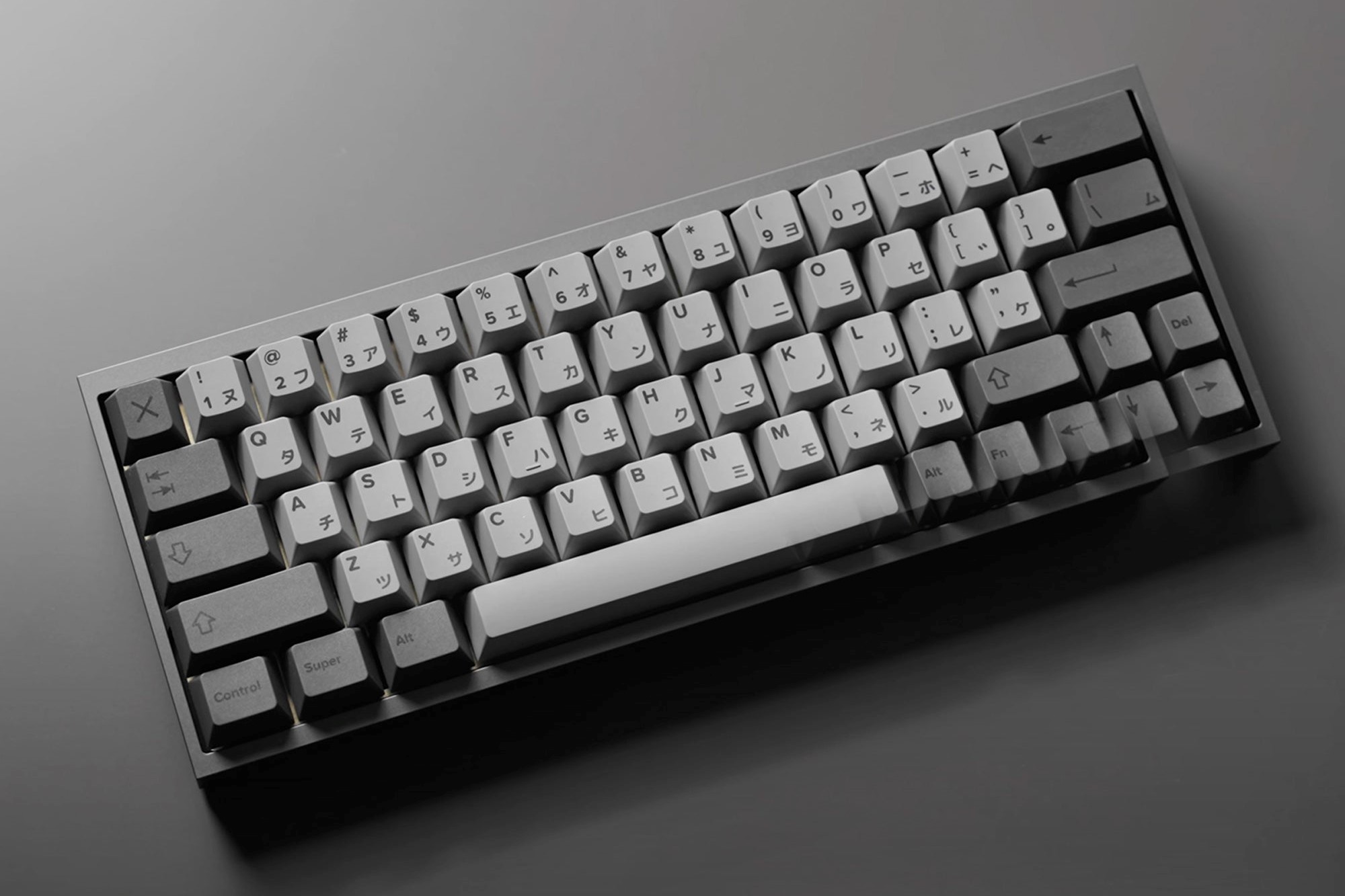
The 60% keyboard layout strips a board down to its essentials: alphas, modifiers, and a function row accessed through layers. No numpad, no arrow cluster, no navigation block. What you get in return is a compact footprint that frees up desk space, pulls your mouse closer, and makes for a cleaner setup.
That trade-off clicks for a specific kind of user. Gamers like 60% boards because less board means more mouse room. Typists appreciate the tighter hand position. Custom keyboard builders gravitate toward the 60 keyboard because it has the most mature custom ecosystem in the hobby—more cases, PCBs, and keycap sets are designed around this layout than any other size.
This guide covers the best 60% keyboards for all three use cases.
What Is a 60% Keyboard Layout?
A 60 percent keyboard typically has around 61 keys. It removes the function row, numpad, and navigation cluster entirely. Those functions still exist—they're reached through layers, usually Fn + another key.
The result is a board roughly 11–12 inches wide compared to 17+ inches for a full-size. A TKL keyboard lands around 14 inches and removes only the numpad. The 60% keyboard layout goes further, and that extra reduction is either a dealbreaker or exactly the point, depending on what you need.
Most 60% boards follow a standard row stagger. Some use HHKB-style bottom rows or WKL (Winkey-less) layouts, which matter if you're shopping custom cases or running GMK keycaps that require specific row compatibility.
Best 60% Keyboard for Gaming
For competitive gaming, the 60% layout's main advantage is mouse room. Players using low-sensitivity settings benefit from a keyboard that doesn't crowd the mousepad. The reduced footprint also eliminates keys you'd never use mid-game.
KBDFans Tofu Redux V2 HE — Best 60% for Competitive Gaming
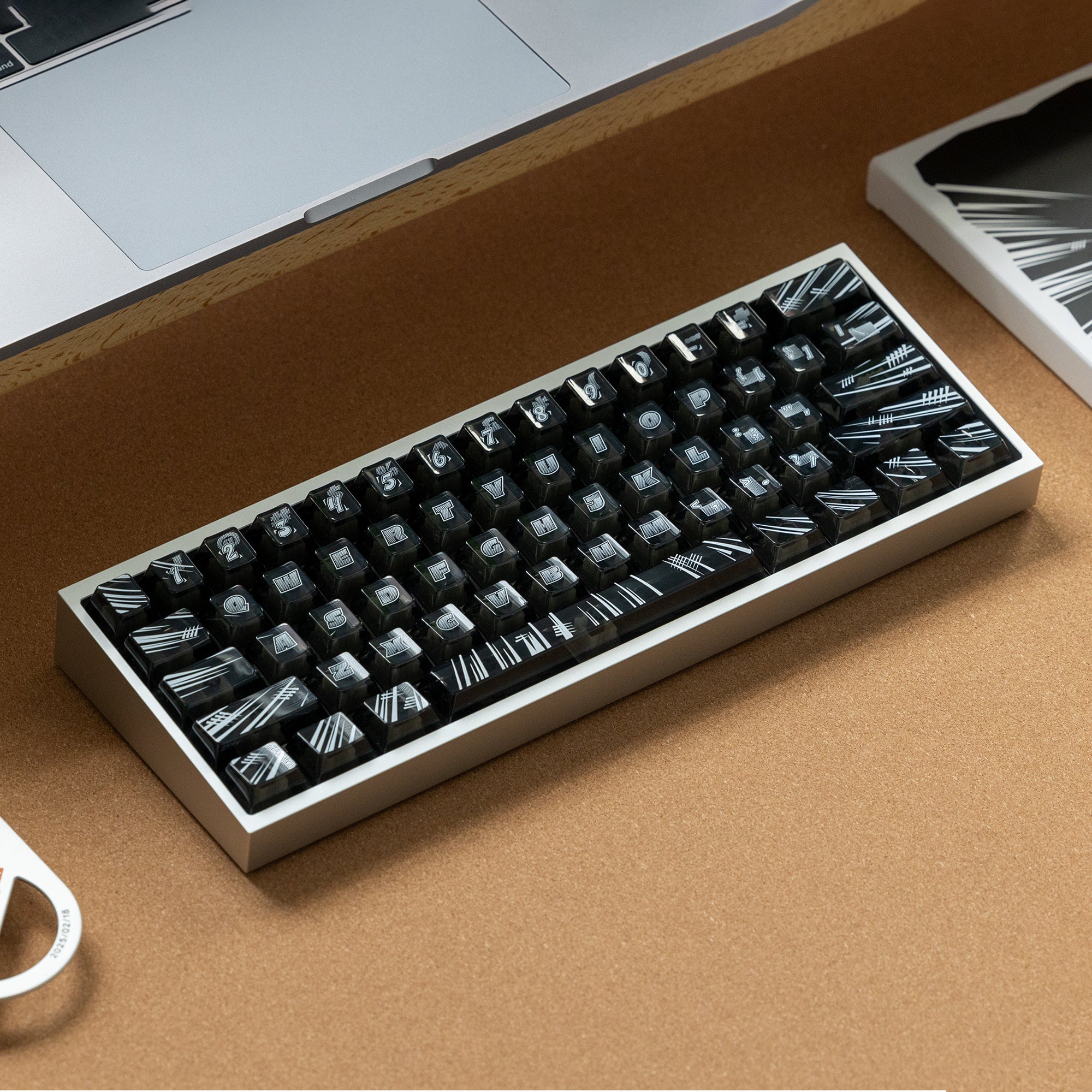
The KBDFans Tofu Redux V2 HE is a fully assembled 60% keyboard with hall-effect magnetic switches and rapid-trigger support. You can set actuation anywhere from 0.1mm to 4mm and enable rapid-trigger so each keystroke reregisters the moment you release it—no waiting for a reset point.
For competitive FPS or fast-paced games that reward quick repeated inputs, rapid-trigger is one of the most meaningful hardware advantages you can add to a keyboard. Hall-effect switches also don't degrade the way spring-actuated switches do over time. This is the Tofu case rebuilt on KBDFans' magnetic platform — the board that replaced the older Tofu60 HE — and it ships hand-tuned and ready to use with a PBTfans Flash keycap set. No building, no sourcing, no soldering.
Why it wins for gaming: Hall-effect switches with rapid-trigger in a true 60% footprint, in the Tofu case. Best KBDFans option for competitive play without a custom build, and at $159 it is also the cheaper of KBDFans' two ready-to-use HE boards — all four colorways ship immediately.
KBDFans Holy60 HE — Same Feature Set, Fourteen Colorways
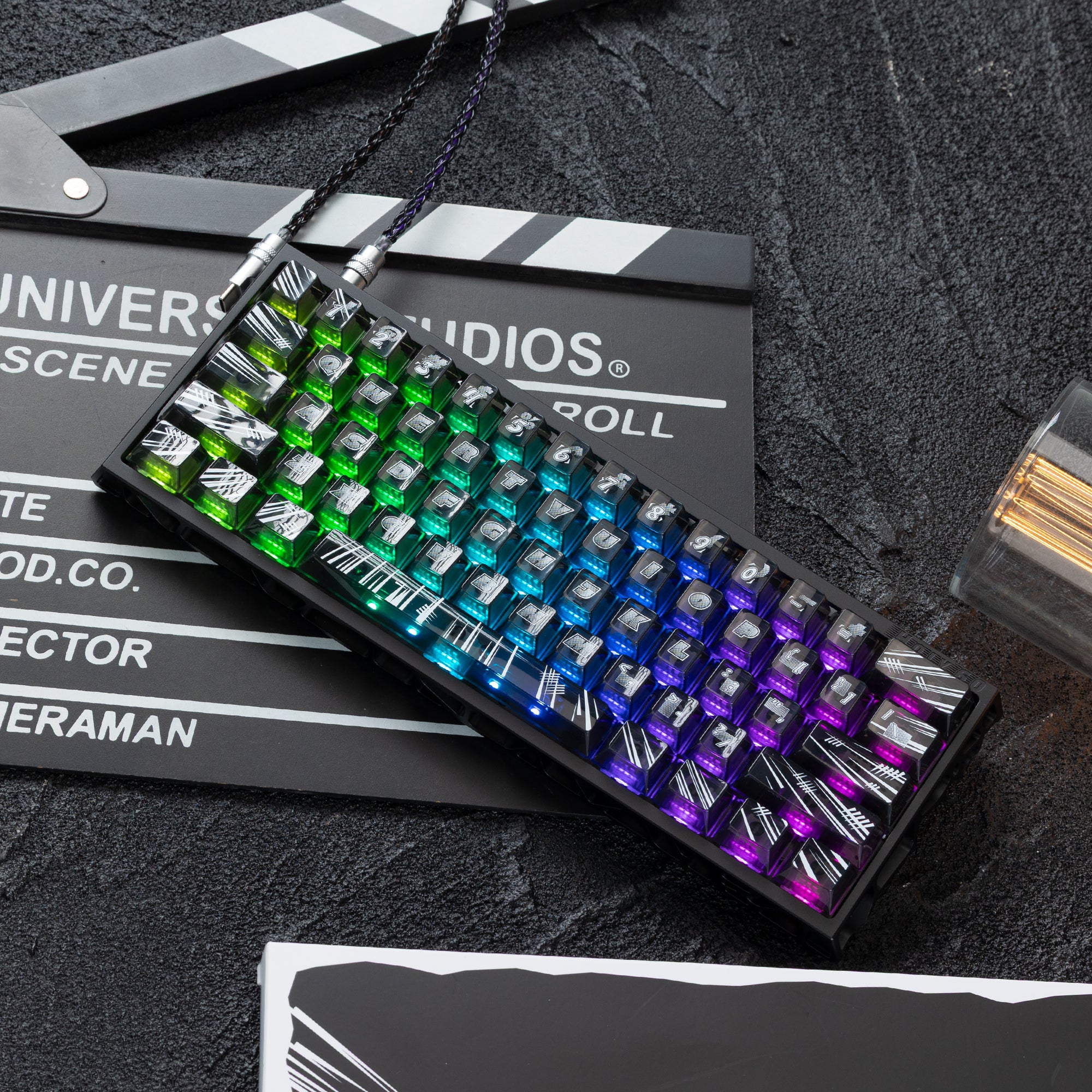
If the Tofu case isn't the part you care about, the KBDFans Holy60 HE gives you the same hall-effect platform — adjustable actuation, rapid trigger, fully assembled, PBTfans Flash keycaps included — for $213. The difference is the case: a lighter structural design rather than the Tofu's solid aluminum block, so it sounds and feels less dense.
Why it's here: Same switch technology and same ready-to-use convenience. You are paying the premium over the Tofu Redux for finish choice rather than for feel — it ships in fourteen colorways against the Tofu Redux's four, all fourteen currently in stock. If the colour you want is on this board and not that one, that is the whole case for it.
Best 60% Keyboard for Typing
Typing on a 60 keyboard means adjusting to layers for keys like Delete, Home, End, and arrows. For most people, that adjustment takes less than a week. What you gain is a more centered hand position without reaching toward a far-right navigation cluster on every other edit.
Keychron Q4 Pro — Best Premium 60% for Typing
The Keychron Q4 Pro is Keychron's flagship 60% board and the cleanest typing-focused option in this layout. It has an all-aluminum frame, hot-swap PCB, QMK/VIA programmability, Bluetooth and 2.4GHz wireless, and gasket-mount construction that noticeably softens the typing feel compared to top-mount boards at the same price.
It ships barebones from $143.99, meaning you choose your own keyboard switches. That matters for typing: you can dial in exactly the feel and sound profile you want.
For a tactile typing build, the Gazzew Boba U4T is a thocky tactile with a sharp bump that translates well in aluminum builds. The Drop + Invyr Holy Panda is the more iconic enthusiast tactile—a pronounced, deliberate feel with each keystroke that has been the reference point for the category for years.
Why it wins for typing: Premium build, wireless, hot-swap, and QMK/VIA in a true 60% footprint. Keychron makes few 60% boards—the Q4 Pro is the one to get.
Best 60% Keyboards for Custom Builds
The 60% layout has the deepest custom keyboard ecosystem of any form factor. More PCBs, cases, plates, and keycap sets target this size than anything else. If you want a full enthusiast build—from bare case to finished board—starting at 60% gives you the most options at every price point.
KBDFans Tofu60 3.0 — Best Budget 60% Custom Kit
The KBDFans Tofu60 3.0 is the community's default starter kit for 60% builds. It supports WK, WKL, and HHKB bottom rows, pairs with hot-swap PCBs for flexible switch experimentation, and comes in multiple anodized colorways. The aluminum case gives you a better acoustic foundation than polycarbonate alternatives in the same price range.
For a first build, start here. The Tofu60 form factor has been around long enough that tutorials, sound tests, and community support are easy to find. There's less guesswork than sourcing from less established kits.
KBDFans Tofu60 Redux — Best 60% Kit for a Premium Build
The KBDFans Tofu60 Redux is the more refined take on the same platform. It keeps the tray-mount structure and hot-swap VIA PCB but moves to a denser case with a choice of anodized aluminum, e-coating aluminum, or acrylic. Choose it over the 3.0 when you want more weight and a deeper sound signature without stepping up to a gasket-mount board.
If you would rather skip the build entirely, KBDFans sells the Tofu60 Redux V2 fully assembled with PBTfans Clarvoy keycaps already installed.
Choosing Keyboard Switches for a 60% Build
Switches define how a board feels and sounds. In a 60% aluminum case, switch choice has a direct impact on acoustics. Lighter switches with hollow sound profiles can come across as sharp or thin. Heavier, pre-lubed linears tend to sound fuller and more controlled.
Linear Switches
Gateron Yellow: The default first-time recommendation. Light, smooth, and budget-friendly. Fast for gaming, comfortable for extended typing.
Gateron Oil King: Pre-lubed, heavier spring weight, deeper sound. One of the best stock linear options for a thocky 60% build. Also available through KBDFans.
Gateron INK V2 Black: Premium linear with consistent stroke and a full sound profile. A longtime enthusiast favorite for custom builds.
Tactile Switches
Gazzew Boba U4T: Long-pole tactile with a deep, thocky character. Excellent for typing builds where you want feedback without going clicky. Pairs especially well with aluminum 60% cases.
Drop + Invyr Holy Panda: The benchmark enthusiast tactile. Strong bump, distinctive sound, premium feel. One of the most recognized mechanical keyboard switches in the hobby.
Glorious Holy Panda Lubed: Pre-lubed Holy Panda-style tactile. Good option if you want the Holy Panda character without the lube step.
Clicky Switches
Kailh Box Jade: Sharp, crisp click with a more aggressive feel than standard clicky switches. Loud by design—better suited to solo setups than shared spaces.
Cherry MX Blue: The classic reference clicky switch. If you're comparing clicky options or explaining the category to someone new, this is the baseline.
What to Look For in a 60% Keyboard
Layout compatibility: Not all 60% boards accept the same bottom row configurations. If you're planning to use high-end keycap sets—especially GMK keycaps—verify your board's bottom row matches what the set supports before buying.
Hot-swap vs. soldered: Hot-swap PCBs let you pull and swap switches without soldering. For first builds, hot-swap is strongly recommended. It lets you experiment with different switches later without any irreversible steps.
Case material: Aluminum cases produce a fuller, denser sound. Polycarbonate cases sound lighter and higher-pitched. Neither is objectively better—it comes down to preference and what pairs well with your switch choice.
Wireless support: Most 60% custom kits are wired. If you need wireless, the Keychron Q4 Pro is the primary recommendation. Budget wireless 60% options exist but tend to trade off build quality to hit lower price points.
QMK/VIA support: On a 60% board where layers replace physical keys, QMK/VIA is close to essential. It lets you fully remap every key and configure layers to match your workflow—especially important for navigation keys and shortcuts you've mapped elsewhere.
60% vs. Other Compact Layouts
The 60% keyboard isn't the only compact option worth considering. Here's how it compares:
65%: Adds dedicated arrow keys and a few navigation keys. More practical out of the box, slightly less compact. The KBDFans Tofu65 3.0 is a strong pick if you want something close to a 60% but with arrows.
75%: Retains the function row and arrow keys in a compact package. The Keychron V1 Max is an easy enthusiast-style pick at this size—gasket mount, hot-swap, QMK/VIA, tri-mode wireless, and a rotary knob.
TKL: Full layout minus the numpad. The most forgiving step down from full-size. The KBDFans Tofu TKL is a well-regarded TKL with hot-swap and QMK support if you want more keys without going full-size.
The 60% layout makes the most sense when desk space and mouse room are genuine priorities, or when you want access to the widest possible custom keyboard ecosystem for cases, PCBs, and keycap sets.
Final Thoughts
The best 60 percent keyboard comes down to use case:
- Competitive gaming: KBDFans Tofu Redux V2 HE — hall-effect switches and rapid-trigger in the Tofu case, ships ready to use, and the cheaper of the two (or the Holy60 HE if you want a wider choice of finishes)
- Typing and daily use: Keychron Q4 Pro — aluminum, wireless, hot-swap, QMK/VIA
- Custom builds: KBDFans Tofu60 3.0 — the most versatile 60% kit for first-time builders
If you're shopping prebuilt 60% boards on a tight budget rather than building one, several picks in our budget friendly mechanical keyboards under $100 roundup — including the RK61 and Redragon K617 Fizz — are true 60% layouts that cost a fraction of a custom build.
The 60% keyboard layout has a learning curve. Layers take adjustment, and some workflows don't fit it well. But for users who value desk space, mouse room, and access to the broadest custom keyboard ecosystem, it's a layout that's hard to give up once you've settled in.