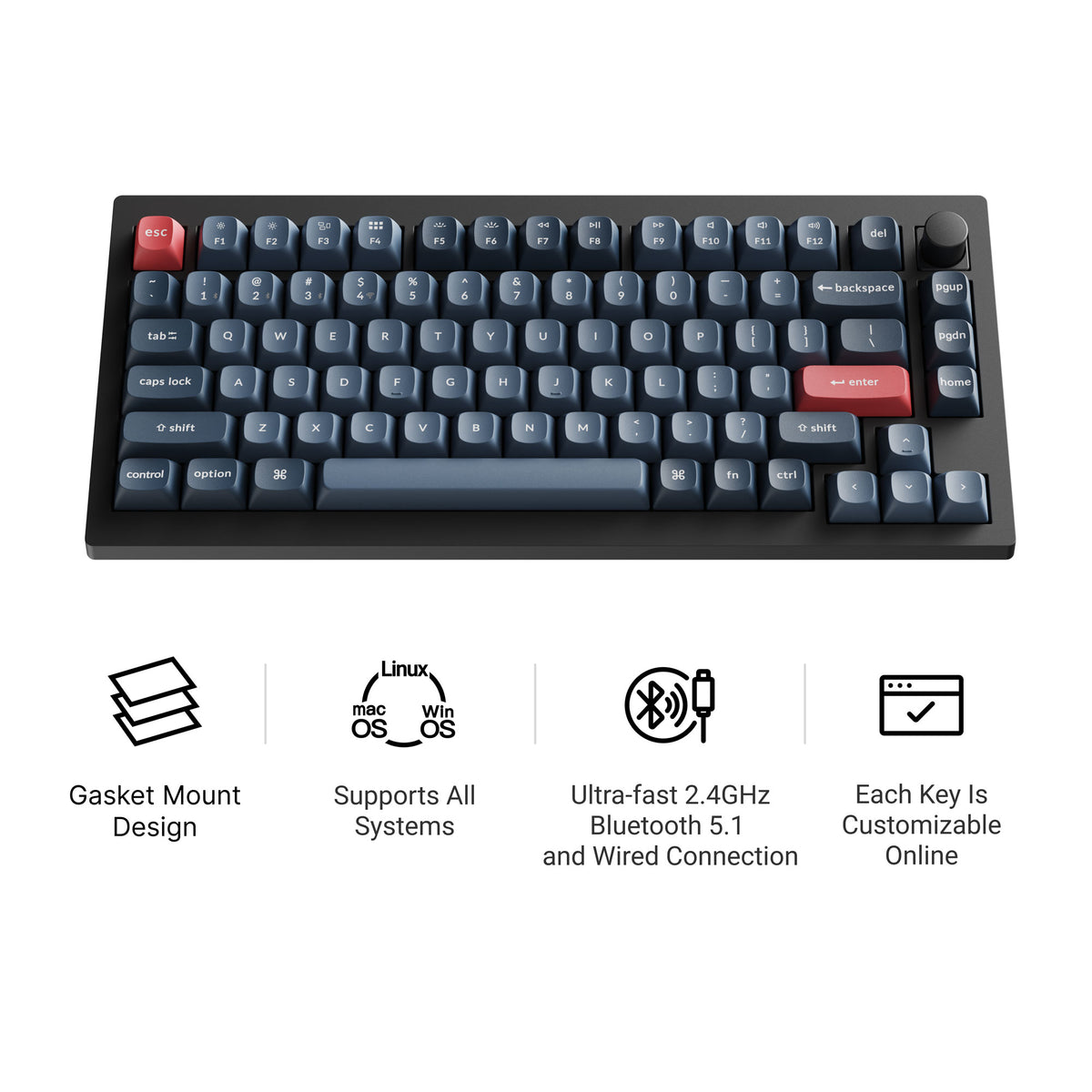
ANSI vs ISO is the question of which physical keyboard layout you have. The two look almost the same, but the Enter key, the left Shift and one extra key are different, and that affects typing habits, keycap sets and which keyboards you can buy. Here is how to tell them apart and which one to choose.
What ANSI and ISO Mean
ANSI comes from the American National Standards Institute. It is the standard layout in the United States and is common on keyboards sold worldwide, especially in the enthusiast market.
ISO comes from the International Organization for Standardization. It is the standard in the UK and most of Europe, with country-specific legends (UK, German, French, Nordic and so on) printed on the same physical shape.
A full-size ANSI keyboard typically has 104 keys, and a full-size ISO keyboard has 105. That one extra key is part of the story.
ANSI vs ISO: The Physical Differences
| ANSI | ISO | |
|---|---|---|
| Enter key | Wide, one row tall | Tall, two rows, upside-down L shape |
| Left Shift | Long (2.25u) | Short (1.25u) with an extra key beside it |
| Backslash key | Above Enter | Next to Enter, under the tall part |
| Right Alt | Alt | Usually AltGr, for extra characters |
| Full-size key count | 104 | 105 |
| Where it is standard | US | UK, most of Europe |
The Enter key
This is the easiest tell. ANSI Enter is a wide key on the home row. ISO Enter is taller, reaching up into the row above, and narrower at the bottom. Typists moving between the two tend to notice this first, because the pinky reaches for Enter differently.
The left Shift and the extra key
ANSI has a long left Shift. ISO splits that space into a short Shift and an extra key, which holds characters like \ and | on a UK layout or < and > on many European layouts. Switching from ANSI to ISO often means hitting that extra key when you meant Shift, at least for the first week.
AltGr
Most ISO layouts use the right Alt as AltGr, which unlocks extra characters such as accented letters or the euro sign. ANSI keeps a plain right Alt.
How to Tell Which Layout You Have
- Check the Enter key. One row and wide means ANSI. Two rows and L-shaped means ISO.
- Check the left Shift. Long means ANSI. Short with a key beside it means ISO.
- Count the keys. 104 on a full-size board points to ANSI, 105 to ISO. On smaller boards, compare against the layout chart in the product listing.
- Check where you bought it. Keyboards sold in the US are almost always ANSI. UK and European listings usually specify ISO and a country code.
Your operating system's language setting does not change the physical layout. It changes what each key types, which is why a UK ISO keyboard set to "US" in Windows will print the wrong symbols on some keys.
Keycap Compatibility
This matters most if you plan to customize. The alpha keys, number row and most modifiers are the same size on both layouts, so the bulk of any keycap set fits either board. The differences come down to three keycaps:
- the ISO Enter
- a 1.25u left Shift
- the extra 1u key beside it
Many enthusiast keycap sets are sold as an ANSI base kit, with ISO support as an add-on or not at all. Before you buy, check that the set includes an ISO kit or at least those three keys. Our keycaps hub and keycap profiles guide are good starting points.
Stabilizers and switches are the same on both layouts, although the stabilizer position under the Enter key can differ between the two versions of the same keyboard.
Which Should You Choose?
Choose ANSI if:
- you type mostly in English
- you want the widest choice of keyboards, kits and keycap sets
- you already type on ANSI and do not want to relearn Enter and Shift
Choose ISO if:
- you type in a language that needs AltGr characters or extra keys
- you learned on ISO and your muscle memory is built around it
- you want legends printed for your country
Many people who grew up on ISO still switch to ANSI for custom keyboards, mostly because of keycap availability. Others stay on ISO because the extra key and AltGr are part of how they write. Both are fine choices.
ANSI vs ISO Across Keyboard Sizes
The difference follows the keyboard down through every common size. A 75% board like the 75% layout keeps the same Enter and Shift difference as a full-size one, and so does a 60% keyboard or a TKL. If you are still choosing a size, start with our keyboard sizes guide, then pick the layout.
Keychron and ISO
Keychron is one of the easier brands to buy in either layout. Most US listings are ANSI, but Keychron sells separate ISO versions of many of its boards. For example, the product page for the Keychron V1 Max links to a V1 ISO collection with UK, German, Nordic, Swiss, French and Spanish layouts. See our Keychron brand hub for the wider range.
Keychron V1 Max
A 75% hot-swappable board with QMK and Keychron Launcher support, tri-mode connectivity, a double-gasket design and screw-in stabilizers. The version linked here is ANSI. If you need ISO, use the ISO collection link on Keychron's product page. When we checked stock, the fully assembled knob version was available with Gateron Jupiter Brown or Banana switches.
Pros: hot-swap, wireless and wired, ISO versions offered separately Cons: ABS plastic case; some configurations on backorder
Bottom Line
ANSI vs ISO comes down to the Enter key, the left Shift and one extra key. Look at your Enter key to see which you have. Pick ANSI for the widest choice of boards and keycaps, and ISO if your language or your muscle memory needs it.
Frequently Asked Questions
What is the main difference between ANSI and ISO keyboards?
The Enter key and the left Shift. ANSI has a wide, single-row Enter and a long left Shift. ISO has a tall, two-row Enter shaped like an upside-down L, and a short left Shift with an extra key beside it.
Which is better, ANSI or ISO?
Neither is better overall. ISO suits languages that need extra characters and an AltGr key. ANSI is the US standard and has the widest choice of keyboards and keycap sets, which matters if you plan to customize.
How do I know if my keyboard is ANSI or ISO?
Look at the Enter key. If it spans one row and is wide and flat, it is ANSI. If it spans two rows and is shaped like an upside-down L, it is ISO. A short left Shift with a key next to it also means ISO.
Are ANSI keycaps compatible with ISO keyboards?
Mostly. The alphas, numbers and most modifiers are the same size. An ISO board also needs a tall ISO Enter, a 1.25u left Shift and one extra 1u key, so check that a keycap set includes an ISO kit before you buy.
Is the US keyboard ANSI or ISO?
US keyboards use ANSI. The UK and most of Europe use ISO, with different legends for each country. Japan uses a third layout, JIS.
Can I change my keyboard from ISO to ANSI?
Not with software alone. The key shapes and switch positions are set by the PCB and plate. You can remap keys in software, but the physical Enter and Shift keys stay where they are unless the board supports both layouts.