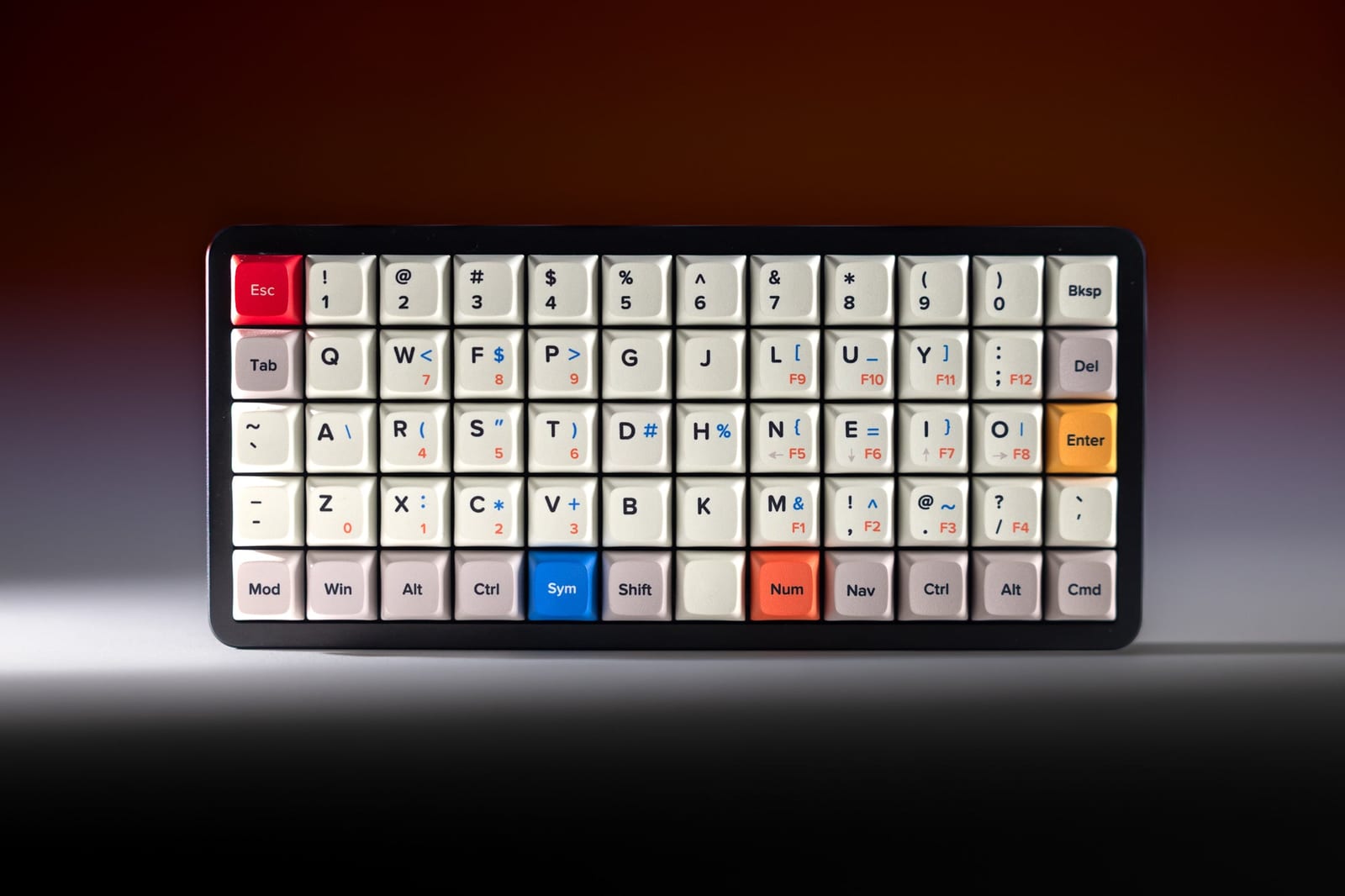
An ortholinear keyboard lines its keys up in a straight grid instead of offsetting each row. It looks strange at first, but a lot of people who try one end up preferring it. This guide covers how a grid compares with a normal staggered layout, what the learning curve is really like, how layers work on a small grid, and where the OLKB Preonic fits. For deeper coverage of grid keyboards, see our sister site, Try Ortho Keys.
What Is an Ortholinear Keyboard?
On a standard keyboard, each row is shifted a little to the right of the one above it. This is called row stagger, and it dates back to typewriters, where the levers behind each key needed room to move.
An ortholinear keyboard drops that offset. Keys sit in straight vertical columns and straight horizontal rows, usually all the same 1u size. "Ortho" means straight, and "linear" refers to the lines of keys.
Most ortholinear boards are compact. Common sizes include:
- 4x12, like the OLKB Planck, with 47 or 48 keys
- 5x12, like the OLKB Preonic, which adds a number row
- larger grids with a numpad or function row, which are less common
Grid vs Stagger: What Changes
The main argument for a grid is finger travel. On a staggered board, your fingers reach diagonally for many keys, and the left hand reaches in a different direction than the right. On a grid, each finger moves straight up and down its own column. Many people find that reduces awkward stretches, especially for the pinkies and for keys like B, N, C and M.
The second change is the thumbs. Standard keyboards give both thumbs one long spacebar. Grid boards usually split the bottom row into several 1u or 2u keys, so your thumbs can reach Space, Enter, Backspace and layer keys. That moves work away from your pinkies.
| Row-staggered (standard) | Ortholinear (grid) | |
|---|---|---|
| Key alignment | Rows offset sideways | Straight columns and rows |
| Key sizes | Mixed (1u to 6.25u) | Mostly 1u |
| Thumb use | One long spacebar | Several thumb keys |
| Learning curve | None, it is the default | Days to weeks |
| Keycap compatibility | Almost any set | Needs a set with ortho or 1u kits |
A grid is not a full ergonomic fix on its own. Your hands still sit close together on one board. If wrist angle is the concern, a split keyboard goes further. Our ErgoDox 76 Hot Dox V2 review covers a split board that uses a column layout with thumb clusters, and Alice layout keyboards are a gentler middle step.
The Learning Curve
Expect to be slow at first. The two most common stumbles are:
- Bottom-row letters. Keys like C, V, B and N move, and your fingers will aim for where they used to be.
- Missing keys. On a compact grid, symbols, arrows and the function row are on layers. You have to learn where they went.
Many people report the first few days being frustrating, a week or two before it feels usable, and a few weeks before they are back near their old speed. Using the grid every day helps. Switching back to a laptop keyboard often during that period tends to slow things down. Some people switch fully; others keep both and get used to moving between them.
How Layers Work on a Small Grid
A 5x12 grid has 60 key positions. That is enough for letters, numbers, and the main modifiers, but not for a function row, arrow cluster or numpad. Those move to layers.
A layer works like the Fn key on a laptop, taken much further. You hold a layer key with your thumb, and the whole board changes. A common setup looks like this:
- Base layer: letters, Space, Enter, Backspace, modifiers
- Lower layer: symbols and brackets under the home row
- Raise layer: F-keys, arrows on the home row, media keys
- Adjust layer: keyboard settings, reached by holding Lower and Raise together
The Planck and Preonic helped popularize this Lower/Raise approach, and QMK firmware, which grew out of Jack Humbert's firmware for OLKB boards, makes it fully programmable. You can put any key or macro on any position. Our guide to macro programming on mechanical keyboards covers the basics. For Planck- and Preonic-specific setup, Try Ortho Keys has a guide to configuring your Planck or Preonic.
The OLKB Preonic Rev 4
The Preonic is one of the best-known ortholinear keyboards. It is designed by Jack Humbert of OLKB and is basically a Planck with a dedicated number row, which makes it an easier first grid for people who do not want numbers on a layer. The Rev 4 is the latest revision, sold through Apos Audio.
Here is what the listing offers:
- Switch options: barebones (no switches), Gateron Yellow KS-3 linear, or TTC Silent Bluish White V2 tactile
- Case colors: Black, Silver or Yellow
- Legends: QWERTY or Colemak
- Firmware: QMK
It is a pre-order. The listing gives an expected ship date of the end of November 2026, so check the product page for the latest timing before you order. We have not tested the Rev 4 ourselves; the details above come from the Apos listing. For every configuration and price, see the full Preonic Rev 4 breakdown on Try Ortho Keys.
If you want to know more about the stock switches, our Gateron Yellow switches guide covers the Gateron Yellow family, and silent keyboard switches covers the quieter tactile route. Apos's other boards are on our Apos keyboards page.
Apos x OLKB Preonic Rev 4
A compact 5x12 ortholinear keyboard with a dedicated number row, QMK support, and the choice of barebones or assembled with linear or silent tactile switches. A good first grid if you want numbers on their own row instead of a layer. Pre-order; see the listing for ship timing.
Pros: number row makes the switch to a grid easier; QMK layers; Colemak legends available Cons: pre-order, so not immediate; compact grid means learning layers; needs ortho-compatible keycaps if you change sets
Keycaps for Ortholinear Keyboards
Because most keys on a grid are 1u, standard keycap sets do not always cover the bottom row. Look for sets that include an ortho kit or plenty of 1u and 2u modifiers. Uniform profiles such as DSA and XDA are popular on grids because every row is the same shape, so any cap can go anywhere. Try Ortho Keys rounds up budget keycaps that fit ortho keyboards.
Is an Ortholinear Keyboard Right for You?
An ortholinear keyboard is worth trying if you like the idea of straighter finger movement, more thumb keys and a fully programmable layout, and you are willing to spend a few weeks relearning. If you want something that works exactly like your current keyboard on day one, stay with a staggered board and look at our keyboard sizes guide instead. If you do want to try a grid, the Preonic's number row makes it one of the friendlier places to start. To compare it with other grids, see the best ortholinear keyboards of 2026 on Try Ortho Keys.
Frequently Asked Questions
What is an ortholinear keyboard?
An ortholinear keyboard places its keys in straight columns and rows, like a grid, instead of shifting each row sideways the way a standard keyboard does. Most use keys that are all the same size.
Are ortholinear keyboards better?
Some people find them more comfortable because each finger moves straight up and down a column instead of reaching diagonally. They are not better for everyone, and the learning curve is real. It comes down to whether you are willing to retrain your fingers.
How long does it take to learn an ortholinear keyboard?
It varies a lot. Many people report being slow and error-prone for the first few days, usable after a week or two, and back near their old speed within a few weeks of daily use. Switching back and forth with a staggered keyboard can slow that down.
What is the Preonic?
The Preonic is a compact ortholinear keyboard designed by Jack Humbert of OLKB. It is a 5-row by 12-column grid, which adds a dedicated number row to the 4-row Planck. The Rev 4 is the latest revision, sold through Apos.
Is the Apos x OLKB Preonic Rev 4 in stock?
It is a pre-order. The listing says it is expected to ship at the end of November 2026, so check the product page for the current timing before you order.
Do ortholinear keyboards need layers?
Compact ones do. A 5x12 board like the Preonic has no room for a full function row, arrow cluster or numpad, so those keys live on layers you reach by holding a key. Firmware like QMK lets you design those layers yourself.